
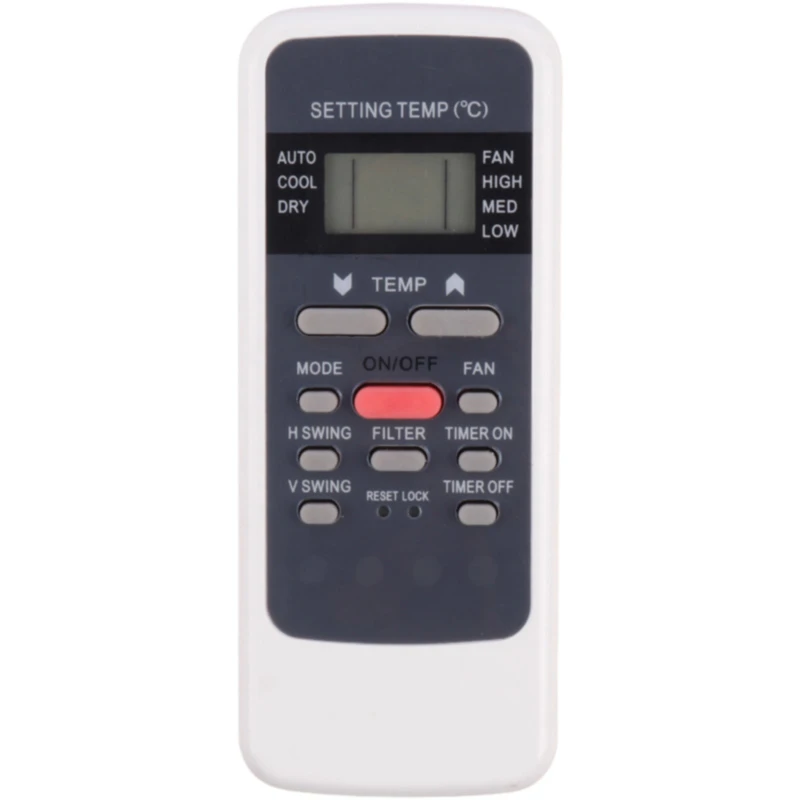
کنترل کولر جنرال مکس General Max
- برای تنظیم دمای دلخواه، دکمههای افزایش یا کاهش را فشار دهید تا عدد روی نمایشگر تغییر کند.
- با فعالسازی حالت Cool، دستگاه بهصورت خودکار محیط را خنک کرده و دما را ثابت نگه میدارد.
- برای صرفهجویی در انرژی، از حالت Turbo استفاده نکنید و دمای استاندارد حدود ۲۴ درجه سانتیگراد را حفظ نمایید.
- با زدن دکمه تایمر، میتوانید زمان روشن یا خاموش شدن کولر را بهطور دقیق برنامهریزی کنید.
- برای تمیز کردن فیلترها و افزایش راندمان، هر دو هفته یکبار آنها را خارج کرده و بشویید.
- گارانتی اصالت سلامت فیزیکی
- پشتیبانی ۲۴ ساعته
- مشاوره تلفنی رایگان
- ارسال به تمام نقاط ایران
In the scorching heat of summer, ensuring your air conditioning system operates at peak efficiency is crucial for both comfort and energy conservation. The General Max brand has established itself as a reliable provider of cooling solutions, offering robust units that balance performance with durability. However, getting the most out of your investment often comes down to how you manage the system's settings. A central component of this management is the کنترل کولر جنرال مکس General Max (General Max AC remote controller). Understanding how to navigate its interface can significantly enhance your cooling experience while reducing electricity bills.
Understanding the General Max Remote Interface
Before diving into specific settings, it is essential to familiarize yourself with the physical layout of the remote. Most General Max units come with a standard digital remote that features a Liquid Crystal Display (LCD) screen. This screen provides real-time feedback on the current mode, temperature settings, fan speed, and timer status. Unlike older analog dials, the digital interface allows for precise adjustments, typically in one-degree increments.
When you first take possession of the remote, it is advisable to replace the batteries immediately to ensure a strong signal transmission. Weak batteries can lead to unresponsive commands, causing frustration when you are trying to cool down a room quickly. The remote generally utilizes IR (Infrared) technology, meaning it must be pointed directly at the indoor unit's receiver sensor for optimal functionality.
Mastering the Core Buttons
The core functionality of the کنترل کولر جنرال مکس revolves around a few key buttons:
- Power On/Off: The primary button to start or stop the unit.
- Mode Selection: This allows you to switch between Cooling, Dehumidifying, Fan-only, and Auto modes.
- Temperature Up/Down: Used to adjust the target temperature.
- Fan Speed: Controls the intensity of the airflow.
Cooling vs. Auto Mode
One of the most common mistakes users make is leaving the unit in "Auto" mode when they need immediate relief from heat. While Auto mode is efficient for maintaining a steady temperature, "Cool" mode forces the compressor to run until the set temperature is reached. For rapid cooling, selecting the Cooling icon (usually a snowflake symbol) is the most effective strategy.
Optimizing Energy Efficiency
Energy consumption is a major concern for homeowners and businesses alike. The General Max remote includes specific features designed to minimize power usage without sacrificing comfort. Utilizing the Timer function is one of the best ways to achieve this. By programming the remote to turn off the AC shortly before you fall asleep or leave the house, you avoid wasting energy cooling an empty room.
Using the Sleep Function
The Sleep function is a hidden gem in the کنترل کولر جنرال مکس General Max arsenal. When activated, the unit will automatically increase the temperature by one degree every hour during the first few hours of operation. This gradual increase aligns with the natural drop in body temperature that occurs during sleep, ensuring you remain comfortable without the AC working overtime all night. Additionally, the fan speed usually decreases to a quiet setting, promoting undisturbed rest.
Regular Maintenance Tips
To ensure the remote controller itself remains functional, keep the contact points clean. If you notice the remote is unresponsive, check the batteries and ensure the lens is free of dust. Furthermore, regular maintenance of the AC unit itself, such as cleaning the air filters, ensures that the signals sent by the remote result in optimal air exchange.
Conclusion
Mastery of your air conditioning system begins with understanding its controls. By leveraging the advanced features of the کنترل کولر جنرال مکس General Max, such as the Sleep mode, Timer settings, and precise temperature adjustments, you can enjoy a cooler, more comfortable environment while keeping energy costs low. Treat your remote as a tool for efficiency, not just a switch, and your General Max unit will serve you reliably through every summer season.